Cash Stuffing Google Sheets: Digital Envelope Guide

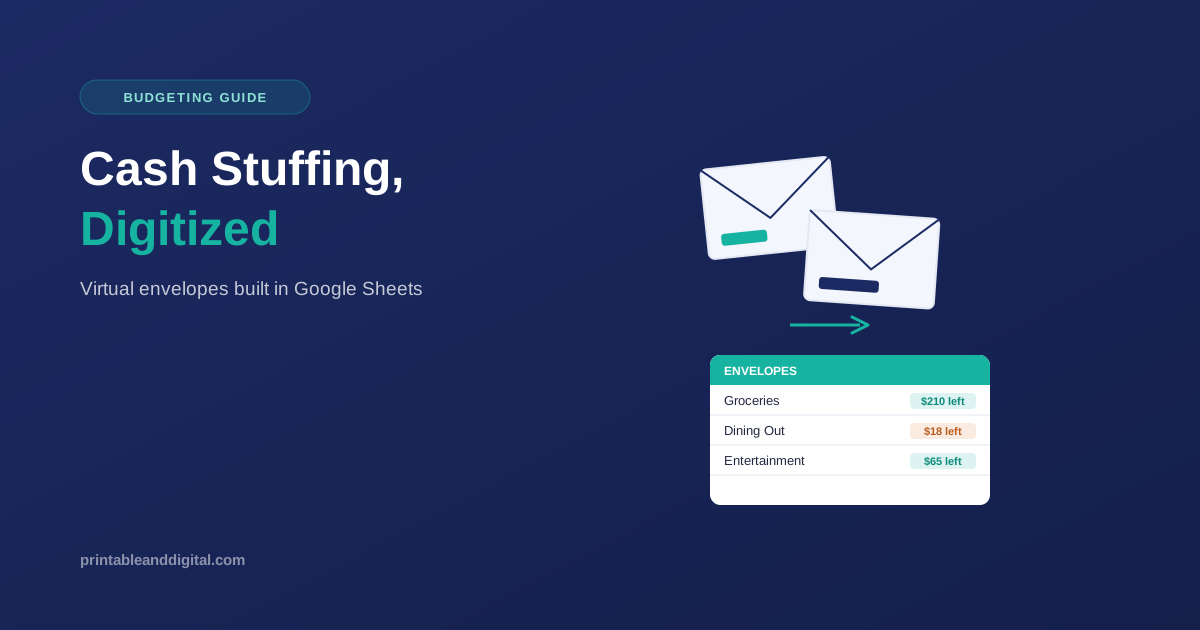
Cash stuffing Google Sheets takes a method that went viral on TikTok—dividing your money into labeled envelopes so you physically can’t overspend—and rebuilds it as a spreadsheet without the cash. You get the same hard limit per category, but your money stays in your bank account the whole time.
If you’ve watched a “cash stuffing” video and thought the idea made sense but the cash part didn’t, this is the version for you.
What Is Cash Stuffing?
Cash stuffing (also called the envelope system) means withdrawing your pay, dividing it into labeled envelopes — one per spending category — and only spending what’s in each envelope. Once an envelope is empty, spending in that category stops until your next paycheck. The idea isn’t new; households have divided cash by purpose for over a century. What’s new is the name and the platform: TikTok’s “FinTok” community popularized “cash stuffing” starting around 2023, and it’s stayed popular since.
What Is Cash Stuffing Used For?
It’s used to create hard, visible spending limits in categories where overspending tends to happen without anyone noticing—groceries, dining out, and entertainment. Instead of discovering you overspent at the end of the month, an empty envelope tells you immediately.
What Is an Example of Cash Stuffing?
paycheck—no Say you’re paid $2,000 every two weeks. You might divide it: $400 for groceries, $150 for dining out, $100 for entertainment, $200 for gas and transport, and the rest for bills and savings. Each amount goes into its own envelope. When the dining-out envelope is empty, you stop eating out until the next paycheck—no moving money around unless you decide to.
Cash Stuffing Google Sheets: How It Works
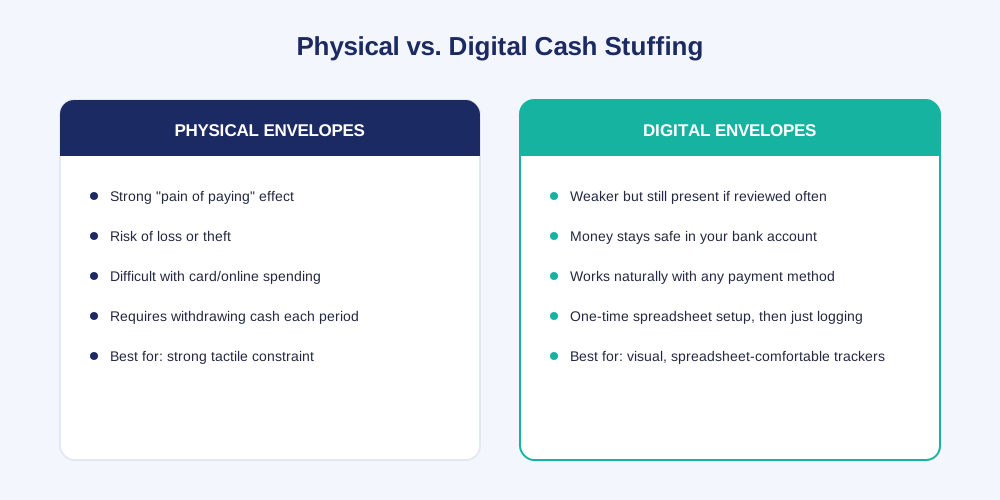
A cash-stuffing Google Sheets setup gives you the same category limits as physical envelopes without carrying any cash. What you trade away is something real: physical cash creates what researchers call “the pain of paying”—a measurable psychological deterrent to spending that a number on a screen doesn’t fully replicate. What you get back is no risk of losing an envelope, no trips to the ATM, and a system that actually works with cards and online purchases, which is how most people spend money now anyway.
Setting Up Your Digital Envelopes
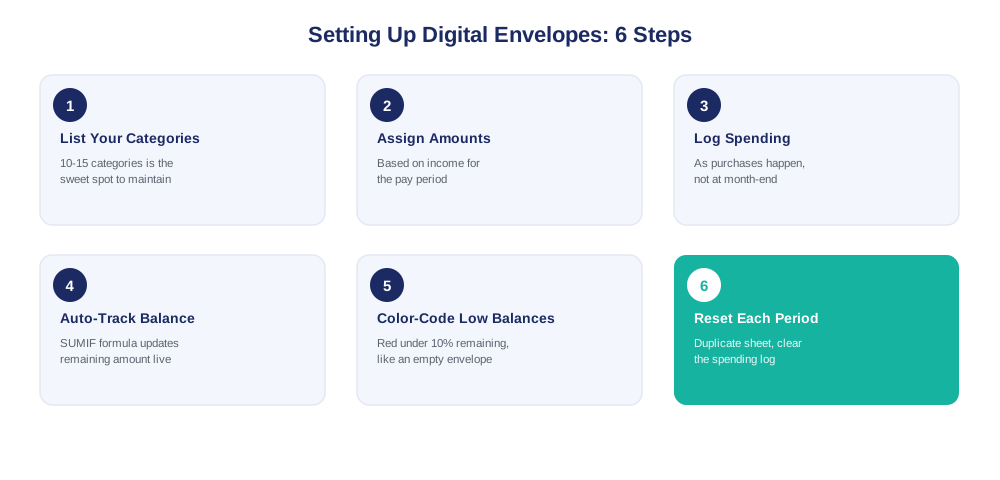
Here’s how a cash stuffing Google Sheets setup actually comes together, step by step.
- spot—enough List your categories. Ten to fifteen is the sweet spot—enough to separate meaningful spending, not so many it becomes a chore.
- Assign each category an amount based on your income for the pay period.
- Log spending against each category as it happens.
- Let a formula track the remaining balance automatically:
=EnvelopeAmount - SUMIF(CategoryColumn, "Groceries", SpentColumn)- do—makes color-code low balances. Conditional formatting that turns a category red under 10% remaining does what an empty envelope used to do—makes the limit impossible to miss.
- Reset each pay period by duplicating the sheet and clearing the spending log, keeping your categories and formulas intact.
What Are Cash Stuffing Categories?
Whatever your actual discretionary spending looks like. Common ones: groceries, dining out, gas, entertainment, subscriptions, personal care, clothing, gifts. Fixed costs like rent usually don’t need an envelope — they’re the same every month and rarely the source of overspending. Envelopes work best for the categories where your spending actually varies.
How to Start Cash Stuffing
Look at last month’s spending first — you can’t set realistic envelope amounts without knowing what you’re actually spending now. Pick 5–8 categories to start, not fifteen. Add more only once the first few are working. Starting too broad and abandoning it within a week is the most common reason this method doesn’t stick, digital or physical.
How Digital Envelopes Compare to Other Methods
Is Cash Stuffing Better Than a Bank Account?
account—your It’s not a replacement for a bank account—your money still lives there in the digital version. It’s a layer on top: a way of mentally (and visually) dividing what’s already in your account so you know what’s actually available to spend in each category, rather than just seeing one total balance.
Can You Use Cash Stuffing Online?
Yes—that’s the entire point of the digital version. Your spreadsheet tracks category limits the same way physical envelopes do, but every purchase, whether it’s a card swipe or an online order, gets logged the same way.
Cash Stuffing vs. the 50/30/20 Rule
These aren’t competing methods—most people use them together. The 50/30/20 rule splits your income into broad buckets (50% needs, 30% wants, 20% savings), while cash stuffing handles the detailed, category-by-category tracking underneath it. You can use 50/30/20 to decide how much goes toward “wants” overall, then divide that portion into specific envelopes—dining out, entertainment, and shopping.
What’s the Alternative to Cash Stuffing?
Zero-based budgeting is the closest alternative, and in practice the two often end up looking nearly identical—every dollar assigned a category until the total reaches zero. If envelopes feel too rigid, a simple monthly budget tracker without hard per-category cutoffs is a lighter option, though it trades away the exact mechanism that makes cash stuffing effective for impulse spending.
Is Cash Stuffing Actually Effective?
Is Cash Stuffing Effective Long Term?
For people who consistently overspend in a few specific categories, yes — the hard-limit structure addresses that directly. For people who already track spending carefully and rarely overspend, it may add structure without adding much benefit. The honest answer is that it works as long as you keep reviewing it; a system opened once a month loses most of its real-time effect.
The 100-Day Cash Stuffing Challenge
A popular variation: commit to a fixed savings goal — often $1,000 or more — over 100 days, using envelopes or spreadsheet categories to hit small daily or weekly targets instead of one large monthly one. The mechanics are identical to regular cash stuffing; it’s just framed as a short, motivating challenge rather than an ongoing habit.
Who Should Try a Cash Stuffing Google Sheets System?
A cash-stuffing Google Sheets system works best for people who overspend in a few specific, identifiable categories rather than everywhere at once—someone who’s consistently over budget on dining out but fine on everything else, for example. It’s also a good fit if you’re comfortable opening a spreadsheet regularly, since the whole method depends on actually looking at your balances, not just setting them up once. If you’d rather not touch a spreadsheet at all, a banking app with built-in spending categories may suit you better than building your own system.
Common Mistakes to Avoid
Too many categories. More than 15–20 become tedious to maintain—the most common reason people quit within the first few weeks.
No rule for moving money between envelopes. Occasionally borrowing from one category to cover another isn’t a problem. Doing it silently, every time, defeats the purpose of having limits at all. Decide your rule before you’re tempted to break it.
Forgetting irregular expenses. Annual subscriptions, gifts, and holiday spending don’t fit neatly into a monthly envelope unless you specifically create a category — or a separate sinking fund — for them.
Setting up once and never checking it. The entire mechanism depends on seeing a balance running low before you overspend it, not after.
Free vs. Paid Templates
Building your own cash stuffing Google Sheets system from scratch just needs a basic SUMIF formula and some conditional formatting—genuinely doable in an afternoon if you’re comfortable with spreadsheets. A paid template skips that setup: the envelope structure, formulas, and formatting are already built, so you’re entering your categories and amounts on day one instead of building formulas.
Our Monthly Budget template and Budget by Paycheck template both use a category-based structure that adapts directly to a digital envelope system—make a copy and start assigning amounts the same day. If you’re building your first budget from zero, our guide to tracking a monthly budget in Google Sheets walks through the basics before you add the envelope layer on top.
For a deeper look at how the traditional (physical) version works, NerdWallet’s guide to the cash envelope system covers the original method this digital version is built from.
FAQs
What is cash stuffing? Cash stuffing is a budgeting method where you divide your money into labeled envelopes — one per spending category — and stop spending in a category once its envelope is empty. A cash stuffing Google Sheets version does the same thing digitally.
What is a cash stuffer? A “cash stuffer” is a printable insert used inside a physical cash envelope, sometimes including a savings tracker or goal chart. In a digital system, the spreadsheet category itself replaces this.
What is the money-saving trick with envelopes? The trick is separation, not the cash itself: money assigned to one category (like groceries) isn’t available for another (like entertainment), which removes the temptation to quietly cover overspending in one area with money meant for another.
Do I need a Google account to build a digital envelope system? Yes. Google Sheets requires a free Google account to create or edit a spreadsheet.
Will a digital cash stuffing spreadsheet work in Excel? You can rebuild the same formulas in Excel, but a Google Sheets template specifically isn’t an Excel file and may not convert perfectly if opened there directly.